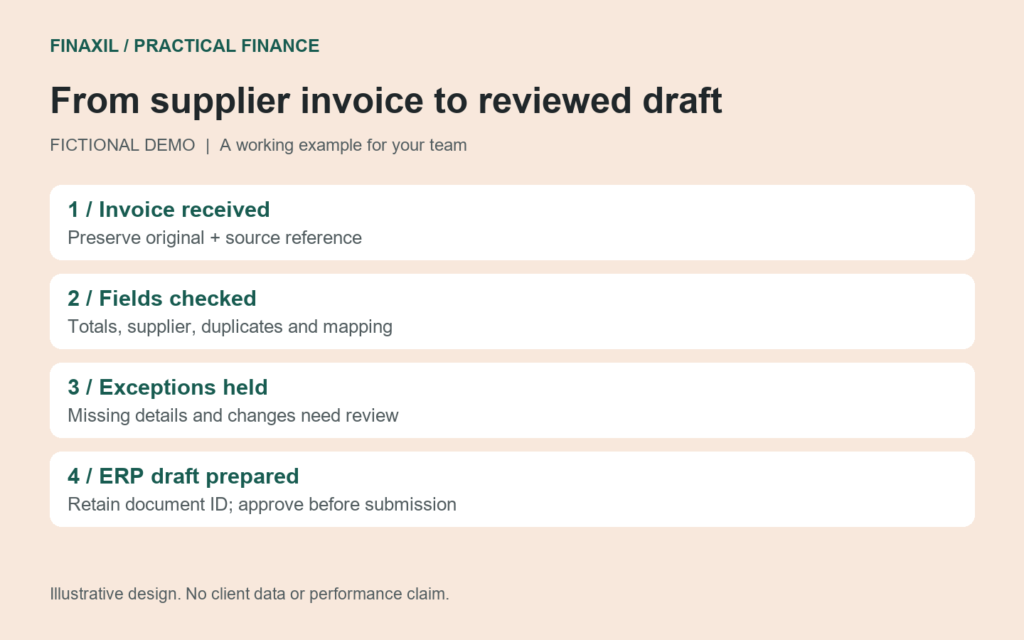
A supplier invoice arrives by email, someone downloads it, another person types it into the accounts, and the same PDF appears again in a shared folder. Automating that journey sounds straightforward until the duplicate becomes a second bill.
For an SME, invoice-to-books automation is a sensible project when it removes repeated entry while making review easier. Start with a narrow workflow and define the exceptions. You do not need an autonomous finance department to make a worthwhile improvement.
Give the first pilot a clear boundary
Choose one company, a controlled invoice inbox or folder and a small group of recurring suppliers. Start with documents your accountant can verify against existing records. Exclude unusual transactions until the basic route works.
Write down the current process: who receives the document, who approves the expense, who selects the account and tax treatment, and who checks that it was booked once. Record the time spent on each step. This becomes the baseline for deciding whether the pilot helps.
Demo: four invoices, four different routes
Fictional workflow demonstration. The references and amounts below are invented. This is a proposed design, not a screenshot of a client deployment. Totals are document totals in AED; the example makes no assumption about VAT eligibility or recoverability.
| Document | Total AED | Check result | Next step |
|---|---|---|---|
| INV-DEMO-101 | 1260 | Known supplier; required fields present | Prepare a draft for reviewer approval. |
| INV-DEMO-101 copy | 1260 | Same supplier, invoice number and amount | Hold as a possible duplicate; create no new bill. |
| INV-DEMO-102 | 840 | Cost centre missing | Ask the responsible person; keep in review. |
| INV-DEMO-103 | 2100 | Supplier payment details differ from master | Hold for independent verification. |
The useful output is one reviewable draft, one suspected duplicate and two held documents. It is not “four invoices posted”. A changed bank account needs verification through an independently trusted route, even if the document looks convincing.
A practical route from inbox to ERP
- Preserve the original. Keep the source attachment, receipt time and a stable reference. Record a document fingerprint to help identify the same file arriving twice.
- Extract the fields. OCR or an AI model can propose the supplier, reference, dates, currency, lines and totals. Preserve the extracted values alongside the source.
- Validate and map. Check totals, mandatory fields, supplier identity and potential duplicates. Map to approved suppliers, accounts and cost centres rather than letting free text silently create masters.
- Route exceptions. Missing references, inconsistent totals and unfamiliar suppliers go to a person. A model’s confidence score is not evidence that accounting treatment is correct.
- Create an ERP draft. Where the system supports it, send the approved mapped data through its API and retain the ERP document ID.
- Approve, submit and reconcile. Follow the configured authority limits. Compare accepted documents with the intake register so failed or missing records remain visible.
What the API connection must handle
Frappe provides REST endpoints for reading and creating documents, with permissions tied to the authenticated user. ERPNext’s Purchase Invoice documentation explains the accounting document and its workflow. A connection still needs the correct fields, supplier and company setup, permissions and validation for that installation.
Use an integration account with only the access required. Keep credentials on the server, not in a public spreadsheet or browser script. Treat invoice text as untrusted data: a sentence inside a PDF must not become an instruction to change payment details or bypass approval.
Plan for a request timing out after the ERP has already created the bill. A retry should first check the saved integration reference and ERP response, rather than blindly creating another document. A file fingerprint catches identical files; a supplier-and-invoice reference check helps catch renamed or rescanned copies. Neither should replace review of ambiguous matches.
Choose the smallest suitable platform
A controlled Google Sheets register and Apps Script may suit a small team that already works in Google Workspace. A database-backed application may fit larger review queues or more granular access requirements. n8n, Make or another workflow platform can coordinate steps where suitable connectors exist. Hosting, extraction, connector and maintenance costs still need assessment.
Choose based on document volume, permissions, exception handling and support ownership. Ask who will notice a failed import and fix it next month, not only who can build the first demonstration.
How to judge whether the pilot is ready
Test duplicate files, rescans, credit notes, unreadable documents, foreign currency and API failures. Track review time, extraction corrections, duplicate blocks and missing ERP records. Agree acceptance criteria before expanding access or allowing any approved low-risk rules to submit automatically.
For the next stage, our bank reconciliation and ERP posting guide shows how bank transactions can be matched and reviewed. Invoice capture and bank matching are related workflows, but one does not prove the other is complete.
Put this to work in your business
Finaxil can help turn a repetitive accounting task into a scoped, reviewable workflow. Describe how invoices reach your team, which ERP you use and where staff spend the most time. Please use anonymised examples until a suitable secure sharing route is agreed. Discuss your requirements with Finaxil. Tell us your current accounting system, approximate transaction volume and the decision or workflow you want to improve. We can agree a focused assessment before discussing a project or ongoing support.
Technical sources
Frappe REST API documentation and ERPNext Purchase Invoice documentation. The routing rules, controls and demo records above are a proposed editorial design, not a claim that every accounting package includes these features by default.
Share with the person handling supplier invoices: #FinanceAutomation #InvoiceAutomation #ERPNext #UAEbusiness
Create an image post for LinkedIn, Instagram & WhatsApp Status
Share the article image and a ready-to-use caption. First copy the caption, then choose Share image and select LinkedIn or another app. Paste the caption into your post if the app does not include it. You can also download the image to post later.