A practical AI automation use case for small businesses and their accountants.
Your bank statement is downloaded. The books are open. Now comes the familiar work: copy descriptions, separate receipts from payments, find voucher references, categorise bank charges and investigate the lines that do not agree.
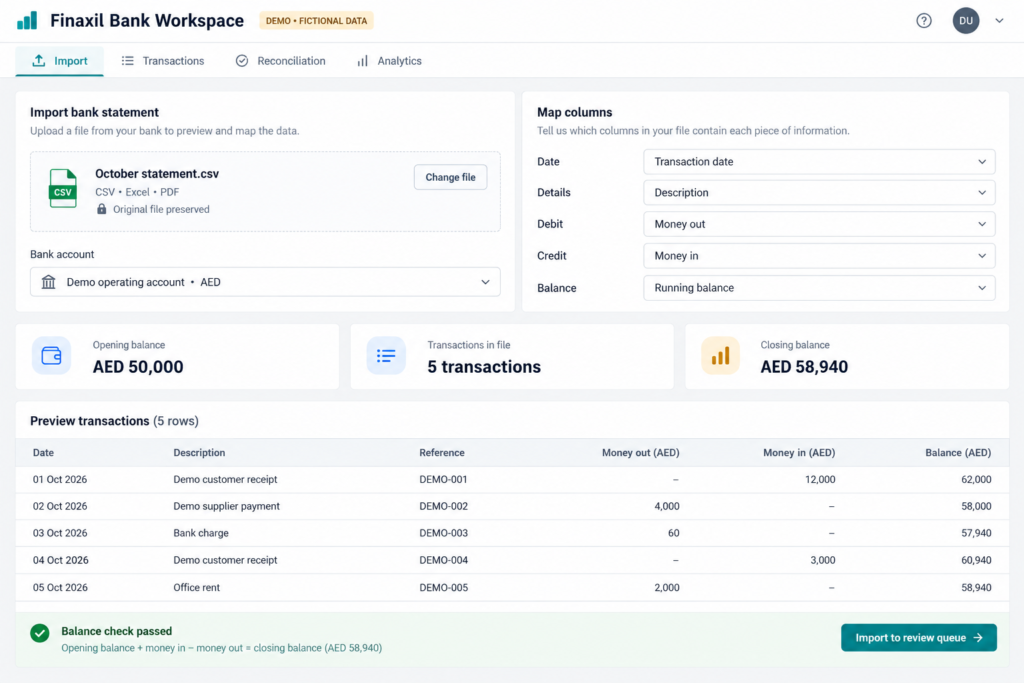
Much of that work follows a pattern. A small bank workspace can import the statement, organise transactions, suggest matches against your ERP and prepare approved entries for posting. You do not necessarily need a large software project to begin.
Google Sheets with Apps Script is a practical starting point for a small team. A database-backed application using Supabase becomes attractive when you need stronger separation between users, more structured records and a more responsive interface. Claude or ChatGPT can help write the extraction scripts and application code. The accountant still defines what a correct result looks like.
This guide goes beyond our first reconciliation pilot: it explains the working design, the review screens and the controlled path from statement to ERP voucher.
The tools in this workflow
 Google SheetsShared review sheet
 Apps ScriptImport and automation
 SupabaseDatabase and backend
 ClaudeCode assistance
 ChatGPTCode assistance
What are we actually automating?
Think of the workflow as seven steps:
- Upload a bank statement in CSV, Excel or PDF format.
- Preserve the original file and extract its transactions.
- Standardise dates, references, amounts and balances.
- Suggest categories and compare transactions with ERP records.
- Review exceptions, add remarks and approve the appropriate action.
- Link existing vouchers or create approved missing entries through the ERP API.
- Read the result back and complete the reconciliation.
Reconciliation and posting are different actions. If the payment is already in the ERP, the job is to match it and record the relevant reconciliation information. Creating another payment would duplicate the books. If a bank charge genuinely has not been recorded, a new accounting entry may be appropriate after review.
This is a statement-processing workflow. It does not need permission to initiate bank payments.
Google Sheets or Supabase?
| Decision | Google Sheets + Apps Script | Supabase + a web front end |
|---|---|---|
| Best starting point | A small finance team that already works in Google Workspace and wants a familiar review surface. | A growing application with several users, accounts or companies and more structured access requirements. |
| Working together | Easy sharing, filters, comments and spreadsheet access. Reviewers can edit designated columns directly. | A purpose-built review interface, database constraints and controlled updates. Collaboration features must be designed. |
| Authentication | Can use Google account and Workspace access. Web-app deployment settings determine whether code runs as the owner or the accessing user. | Application authentication can use Supabase Auth, including supported Google sign-in. Authorisation still needs database policies and application rules. |
| Interface | Use the spreadsheet itself, or build an HTML front end with Apps Script’s HTML service. | Build a separate web front end connected to Postgres, storage and backend functions. |
| Speed and scale | Repeated cell-by-cell reads and writes become slow. Batch operations, pagination and smaller jobs matter; Apps Script has execution and service quotas. | Indexed queries and pagination can make larger datasets more responsive. It is not automatically faster: schema, network calls and query design still matter. |
| Backend work | Apps Script can transform data and make authorised HTTP requests to an ERP. | Edge Functions can validate requests and call ERP APIs. Heavy PDF/OCR jobs may need a separate worker because function runtime and CPU limits apply. |
| Trade-off | Quick to understand, but unrestricted edits and simultaneous actions need controls. | More flexibility and stronger application structure, with more setup, maintenance and access-policy work. |
For a modest monthly volume, Sheets can be an efficient first version. For multiple companies or a substantial exception queue, a database often makes the design easier to manage. Neither option is universally the cheapest or fastest. Start with the workflow and the people who must maintain it.
Google explains the deployment identities in its web-app documentation and the limits in its quotas guide. Supabase documents row-level security, function authentication and runtime limits. These details affect the design, rather than being reasons to choose one product by default.
1. Use AI to understand the bank format, then make extraction repeatable
Begin with a masked sample from one bank and one account type. Ask Claude or ChatGPT to identify the transaction table, date format, reference fields, debit/credit convention, currency and running balance. Ask it to list uncertainties instead of guessing.
CSV is usually the simplest input. Excel files may include title rows, merged cells or several worksheets. PDFs may contain searchable text or scanned pages that require OCR. Do not expect one parser to handle all three reliably without adaptation. A JavaScript CSV parser should also handle quoted commas and line breaks correctly; splitting every line on a comma is not enough.
For a stable bank format, use AI to help generate and test a deterministic parser. You do not need to send every future statement to a language model if ordinary code can extract the same fields. If AI-assisted extraction is used, validate the output independently before it reaches the review queue.
A useful starting prompt: “Using this fictional bank-statement sample, propose a schema and an Apps Script import routine. Preserve raw rows, normalise dates to YYYY-MM-DD, keep debit and credit separate, and validate the running balance. Flag missing values and ambiguous dates. Do not invent references or post anything to an ERP. Include tests for duplicates, reversed row order and a malformed row.”
Use fictional or properly masked samples while developing. Keep actual statements within your approved data-handling arrangements. AI-generated code needs testing and review, especially around dates, signs, permissions and retries.
2. Keep the original separate from the working data
Store the original statement file in a restricted location. Assign an import batch ID and retain the source filename, file hash, account, currency, statement period, import time and parser version.
In Sheets, separate Imports, Raw Transactions, Working Transactions, Rules and Posting Log. Protect source and calculated columns. In Supabase, use equivalent tables and private file storage, with company and account identifiers on each relevant record.
A useful transaction record contains:
- Source batch ID, original row or page reference and stable transaction ID.
- Transaction date and value date where the statement provides both.
- Original description and bank reference, plus separate normalised matching fields.
- Money out, money in, currency and running balance.
- Suggested party, category, account, cost centre and rule used.
- Reviewer category, remarks, approval status and reviewer identity.
- ERP voucher ID, posting state, last attempt and error message.
Keep source values unchanged. A reviewer correcting an extraction should create a traceable override, rather than silently replacing the raw bank record. Detect an identical uploaded file before importing it again, and also detect overlapping transactions across different statement downloads. Date, amount and description alone may not uniquely identify a transaction.
3. Make the statement prove its own arithmetic
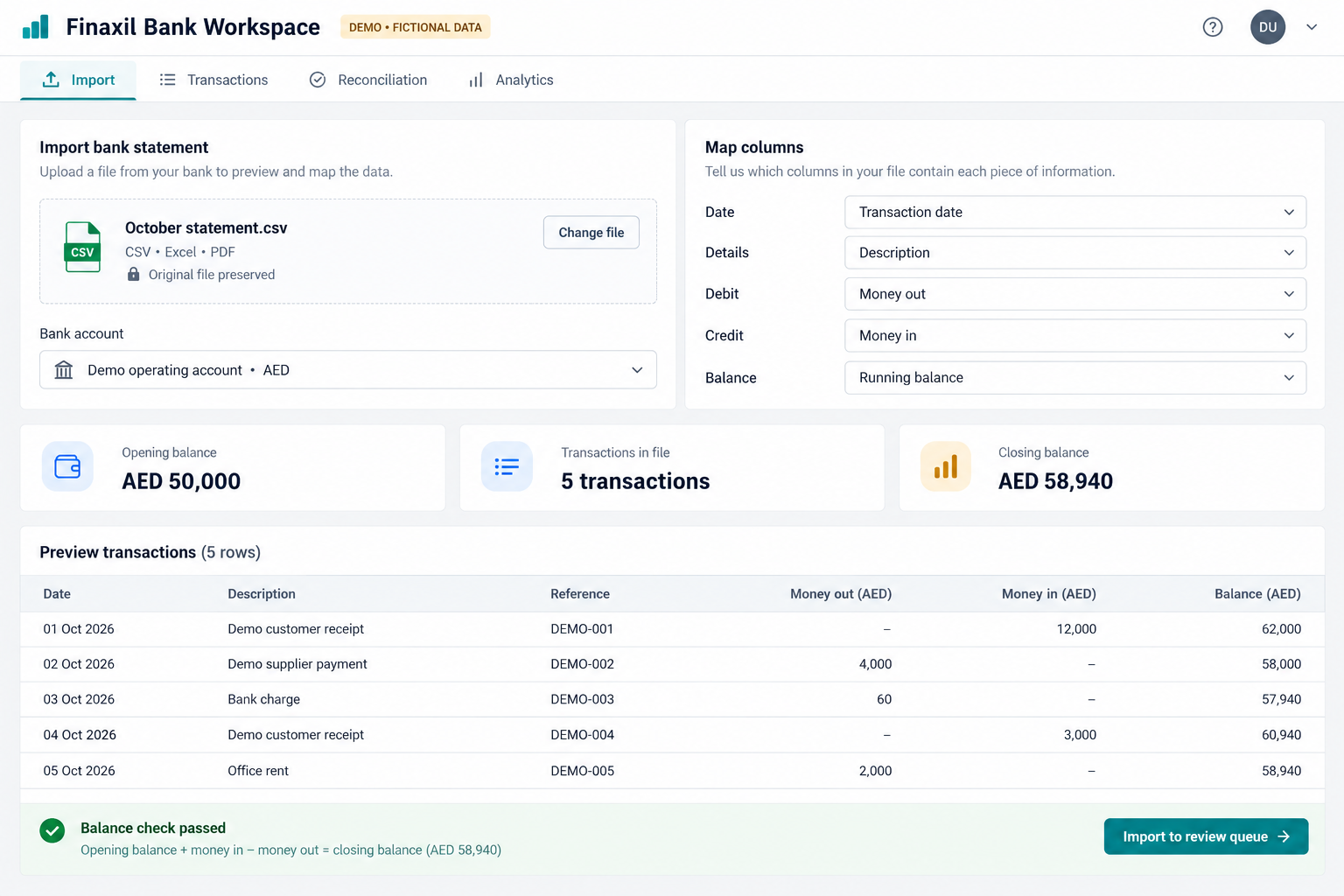
For an account using money-in and money-out columns, the basic check is:
Previous balance + money in − money out = new balance.
Apply the bank’s actual convention. Credit-card, overdraft and reverse-ordered statements can present balances differently. Use fixed decimal amounts or integer minor units, with an explicit rounding policy, rather than relying on unrestricted floating-point comparisons.
Check the opening balance, each available running balance, statement totals and closing balance. A broken sequence can expose a missing row, reversed sign or OCR error. If the statement does not provide a running balance, check the available totals and clearly record that the line-by-line balance check was unavailable.
A balance check confirms extraction consistency. It does not prove the correct expense account, VAT treatment or ERP match.
4. Reconcile in both directions
Fetch the relevant bank-ledger activity or supported reconciliation records from the ERP using an authorised integration. Filter by company, bank account, currency and a suitable date range. Keep track of pagination so a partial API response is not mistaken for the complete ledger.
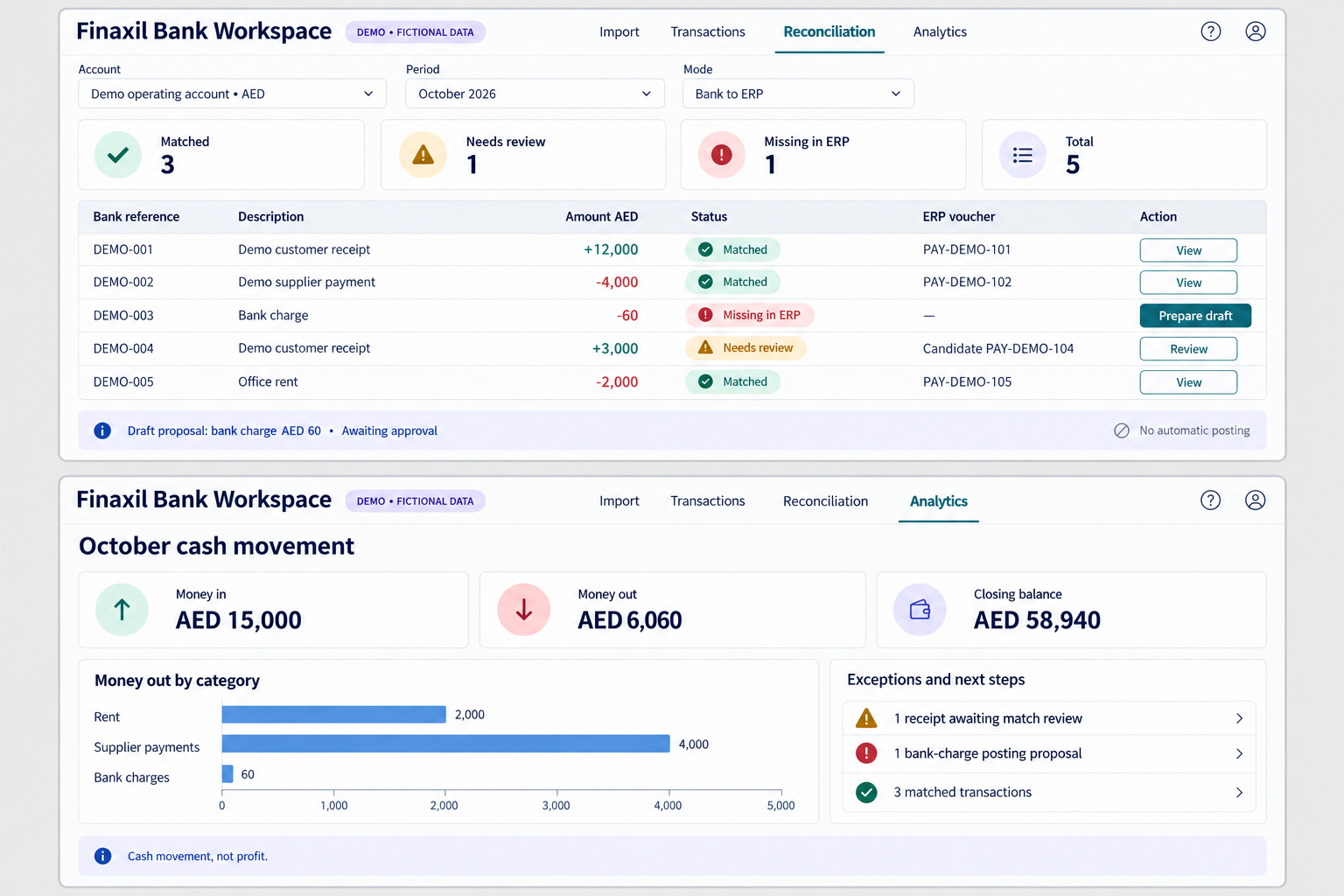
Bank to ERP asks whether each statement transaction has a corresponding accounting record. ERP to bank asks which posted entries have not appeared on the statement. Both views are useful for spotting duplicates and timing differences.
- Strong candidate: the same account, currency, direction, exact amount and a meaningful unique reference, within an agreed date window.
- Needs review: amount and date are similar but the reference is missing, repeated or different.
- Grouped case: a settlement combines several receipts, or a payment covers several invoices. Show the component amounts and evidence.
- Timing difference: a cheque or transfer is recorded in the books but has not cleared. Leave it outstanding until supported.
- Unresolved: no defensible match. Keep it visible instead of forcing a link.
Date, amount and reference are useful together. A running balance validates the bank sequence, not the identity of the ERP voucher. A repeated AED 5,000 amount is not enough to establish a match. Match one-to-one uniquely where appropriate, and prevent one voucher from being allocated twice unless a supported partial-allocation design explicitly permits it.
Use status names that describe evidence. “Reference mismatch” is an exception to investigate, not proof of a posting error. Likewise, “missing in ERP” means no matching record was found under the current search rules. Check date windows, account mapping, permissions and unsubmitted documents before creating anything.
5. Give the accountant useful manual columns
Automation works better when the team can explain what it cannot infer. Provide editable fields for party, category, subcategory, ledger account, cost centre or project, reviewer remarks and the proposed action. Separate the system’s suggestion from the accountant’s approved value.
For recurring transactions, create explicit rules such as “this bank reference pattern, on this account, proposes bank charges”. Give each rule a priority, scope, owner and version. Require review before a correction becomes a general rule. A familiar supplier can receive payments for several different purposes.
AI can suggest a category from a description or help draft a rule. It should not invent a supplier, invoice allocation or tax treatment to make the row look complete. Preserve an “uncategorised” queue when there is not enough evidence.
6. Post through the ERP API with a controlled approval step
First check whether the ERP already provides a suitable import and reconciliation tool. A custom workspace should fill a real gap, not duplicate a feature your team already has. For example, ERPNext distinguishes imported Bank Transactions from the vouchers used in Bank Reconciliation.
For a genuinely missing transaction, build a draft or pending posting proposal with the correct company, bank ledger, counter-account, party, currency, date and references. A customer receipt may need a Payment Entry and invoice allocation; a bank fee may require an appropriate Journal Entry. The right document depends on the ERP and accounting scenario.
After approval, a server-side integration can create the supported document, submit it where authorised and store the returned voucher ID. Read it back to confirm its state. An HTTP success response or saved draft does not necessarily mean the ledger has been posted. Frappe’s REST API documentation explains document access and authentication; document permissions and business validations still apply.
Build in three controls before enabling posting:
- Duplicate prevention: use a stable transaction key and an ERP-side unique external reference or equivalent controlled registry. If an API call times out, search for the result before retrying. Do not assume failure means nothing was created.
- Approval and validation: reject missing accounts, unbalanced entries, closed periods and ambiguous allocations. Keep review and posting permissions distinct where the team structure allows.
- Traceability: record the approved proposal, request identifier, response, voucher ID, user and time. Return failed rows to an exception queue. Use the ERP’s supported cancellation or reversal workflow for corrections.
Keep ERP credentials on the server, never in browser code or a visible worksheet. In Sheets, protect posting actions against simultaneous runs and mark a transaction as in progress. In Supabase, combine authentication with company-level row policies and transactional state changes. Ordinary signed-in users should not receive service-role keys that bypass those policies.
Start with supervised posting. Once the pilot is proven, a business can decide whether narrowly defined, low-risk transaction types qualify for automatic posting under approved rules. That is a finance-control decision, not a setting the AI should choose.
7. Build a dashboard that leads to action
The most useful cards are often straightforward: imported lines, uniquely matched lines, items awaiting review, approved drafts, successfully submitted vouchers and posting failures. Add receipts and payments by period, uncategorised totals and an ageing view of unresolved items.
Allow users to filter by date, account, party, category, cost centre, reviewer and voucher status. Each dashboard number should open the underlying transactions. Show when the ERP data was last refreshed, and keep cash movement separate from profit: a loan receipt is not sales income, and a transfer between your own accounts is not an operating expense.
A sensible first version for a small company
Choose one bank account and a closed month that has already been reconciled. Import it without posting rights and compare every result with the approved reconciliation. Test a duplicate upload, missing reference, two identical amounts, bank fee, transfer, split settlement and a simulated API timeout.
Only then enable draft creation in an ERP test environment. Verify accounts, document types, allocations, permissions and retry behaviour. Move to live supervised posting after finance signs off the results and recovery process.
The advantages are practical: less repeated copying, a shared view of the bank book, consistent categorisation, quicker access to voucher references and a smaller, clearer exception queue. Actual savings depend on statement quality and transaction complexity. For many small teams, a focused workflow is a more manageable first automation than a broad “AI agent” expected to understand the entire business.
Want the prompts and configuration approach?
Write to Finaxil for detailed prompts and configuration guidance, or email info@finaxil.com. Tell us your ERP, statement format, approximate monthly transaction volume and whether your team prefers Google Workspace or a separate application. Begin with a description of the workflow, rather than sending an unmasked statement.
This is one example of the practical AI-for-finance work Finaxil aims to help businesses and finance professionals understand: use AI to build useful tools, then put accounting judgement and clear controls around them. Explore our ERP and automation support or share this guide with the colleague who currently spends the most time on reconciliation.
Technical documentation checked on 24 October 2026. Screens are illustrative mockups with fictional data, not evidence of a deployed product or client results. ERP capabilities, API access, hosting costs and implementation requirements vary by product and configuration.
Create an image post for LinkedIn, Instagram & WhatsApp Status
Share the article image and a ready-to-use caption. First copy the caption, then choose Share image and select LinkedIn or another app. Paste the caption into your post if the app does not include it. You can also download the image to post later.